

If you have ever glanced at your dashboard just as the sun washed it out, you know how a good HUD can feel like a lucky coincidence.
In 2026, you have more choices than ever, from simple GPS projectors to OBD plus GPS systems that show more than speed.
The right one can improve visibility, add useful alerts, and fit your car without hassle, but a few stand out for reasons you might not expect.
| AZIJYV Windshield GPS Speedometer Projector for Cars |  | Best GPS Pick | Display Type: GPS windshield HUD | Speed Display: Yes | Overspeed Alarm: Yes | VIEW LATEST PRICE | Read Our Analysis |
| AZIJYV Car HUD Speedometer with OBD+GPS Dual System |  | Best Dual System | Display Type: OBD+GPS HUD | Speed Display: Yes | Overspeed Alarm: Yes | VIEW LATEST PRICE | Read Our Analysis |
| wiiyii Car Heads Up Display Speedometer (A8) | 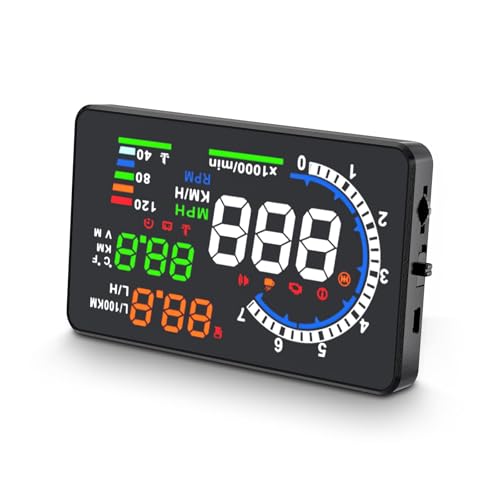 | Best Large Display | Display Type: OBDII/EOBD HUD | Speed Display: Yes | Overspeed Alarm: Yes | VIEW LATEST PRICE | Read Our Analysis |
| 5.5″ Windshield HUD Speed Projector with Overspeed Alarm | 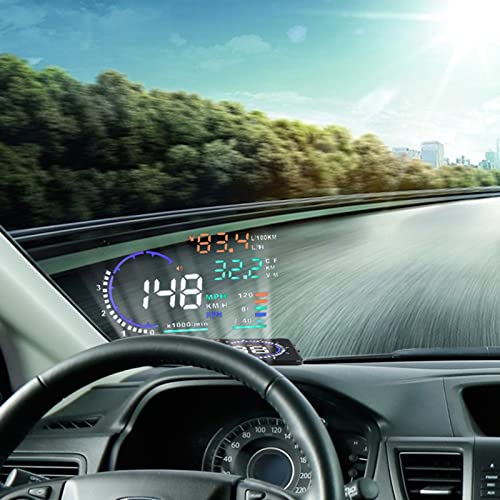 | Best Feature-Rich | Display Type: 5.5″ windshield HUD | Speed Display: Yes | Overspeed Alarm: Yes | VIEW LATEST PRICE | Read Our Analysis |
| wiiyii Car HUD C5 OBDII GPS Scanner | Best Universal Fit | Display Type: OBDII+GPS HUD | Speed Display: Yes | Overspeed Alarm: Yes | VIEW LATEST PRICE | Read Our Analysis | |
| Universal Car HUD GPS Speedometer with Over Speed Alert |  | Best Budget Pick | Display Type: GPS speedometer HUD | Speed Display: Yes | Overspeed Alarm: Yes | VIEW LATEST PRICE | Read Our Analysis |
| HUD GPS Speedometer with Overspeed and Fatigue Alerts |  | Best Accuracy | Display Type: GPS speedometer HUD | Speed Display: Yes | Overspeed Alarm: Yes | VIEW LATEST PRICE | Read Our Analysis |
More Details on Our Top Picks
AZIJYV Windshield GPS Speedometer Projector for Cars
If you want a simple plug-and-play HUD that provides clear speed data without replacing your dashboard, the AZIJYV Windshield GPS Speedometer Projector is a strong choice. It includes a compact M22 unit that mounts with the supplied anti-slip pad and runs on USB power for easy setup. It displays speed, clock, trip time, distance, compass direction, and an overspeed alarm. You can switch between MPH and KM/H, and it powers on and off with your vehicle. Keep in mind that it needs a GPS lock for accurate readings, and reflective film can improve visibility in bright daylight.
- Display Type:GPS windshield HUD
- Speed Display:Yes
- Overspeed Alarm:Yes
- Auto Power:Auto start/shutoff
- Brightness Control:Manual/auto brightness
- Installation:Plug and play
- Additional Feature:GPS compass direction
- Additional Feature:Travel time display
- Additional Feature:Reflective film included
AZIJYV Car HUD Speedometer with OBD+GPS Dual System
The AZIJYV Car HUD Speedometer with OBD and GPS dual system is a strong choice if you want a compact display that supports both OBD and GPS, especially for drivers who need fast plug and play setup and clear windshield data. It shows speed, water temperature, mileage, voltage, and alerts for overspeed, low voltage, fatigue, and faults. Its 3.5 inch reflective screen uses an adaptive light sensor to reduce ghosting and blur. In OBD mode, you can clear codes on compatible gasoline cars after 2009. GPS mode works in any vehicle.
- Display Type:OBD+GPS HUD
- Speed Display:Yes
- Overspeed Alarm:Yes
- Auto Power:Engine on/off linked
- Brightness Control:Adaptive light sensor
- Installation:Plug and play
- Additional Feature:Water temperature display
- Additional Feature:Voltage alarm
- Additional Feature:Fault code clearing
wiiyii Car Heads Up Display Speedometer (A8)
wiiyii’s A8 Car Heads Up Display Speedometer is a practical choice for drivers who want a clear, multifunctional dash companion. It features a 5.5-inch HD screen that makes speed, water temperature, voltage, and trip data easy to read at a glance. It works with OBDII and EOBD vehicles, including most models made after 2003 or 2007, but it does not support OBD I or JOBD. You can switch between kilometers and miles, set speeding and voltage alarms, detect faults, clear error codes, and monitor your car with more confidence. CE, FCC, and ROHS certification provide added reassurance.
- Display Type:OBDII/EOBD HUD
- Speed Display:Yes
- Overspeed Alarm:Yes
- Auto Power:Not stated
- Brightness Control:Not stated
- Installation:Plug and play
- Additional Feature:5.5-inch HD screen
- Additional Feature:Failure clearing function
- Additional Feature:CE FCC ROHS
5.5″ Windshield HUD Speed Projector with Overspeed Alarm
Need a windshield mounted speed display that keeps your eyes up and warns you whenever you are pushing past the limit? The VGEBY 5.5 inch HUD projects speed, RPM, water temperature, voltage, fuel data, mileage, and fault codes from your OBDII or EUOBD vehicle. You can switch between km/h and MPH, and it powers on and off with your car. Manual and automatic brightness control, plus nano reflection reduction, help you read it clearly. The overspeed alarm, fatigue light, high temp alert, low voltage warning, and shift reminder help keep you safer on every drive, especially on long trips.
- Display Type:5.5″ windshield HUD
- Speed Display:Yes
- Overspeed Alarm:Yes
- Auto Power:Auto power on/off
- Brightness Control:Manual/auto brightness
- Installation:Plug and play
- Additional Feature:Instant fuel consumption
- Additional Feature:Shift reminder alert
- Additional Feature:180-day returns
wiiyii Car HUD C5 OBDII GPS Scanner
If you want a compact head-up display that works in almost any vehicle, the wiiyii Car HUD C5 is a strong choice. It offers both OBDII and GPS modes, so you can use it in cars, trucks, hybrids, and diesel models with a simple one-button switch. It displays speed, fuel use, RPM, voltage, water temperature, altitude, and trip data, and the clear fault code feature helps you reset alerts. The high-definition lens, wide viewing angle, and automatic brightness adjustment make the readings easy to see. It is also plug and play, so setup will not slow you down.
- Display Type:OBDII+GPS HUD
- Speed Display:Yes
- Overspeed Alarm:Yes
- Auto Power:Not stated
- Brightness Control:Manual/auto brightness
- Installation:Plug and play
- Additional Feature:Fuel consumption display
- Additional Feature:Altitude display
- Additional Feature:One-button mode switch
Universal Car HUD GPS Speedometer with Over Speed Alert
The Universal Car HUD GPS Speedometer with Over Speed Alert is a smart choice if you want real-time speed data in your line of sight, because its 3-inch heads-up display helps you keep your eyes on the road instead of glancing down at the dashboard. You get a clear digital speed readout, a compass, and overspeed warnings with GPS satellite precision. It works in cars, trucks, boats, motorcycles, and more through USB power. Setup is simple, just plug it in. On initial use, wait 2 to 4 minutes for signal lock, and keep it in an area with a strong GPS signal.
- Display Type:GPS speedometer HUD
- Speed Display:Yes
- Overspeed Alarm:Yes
- Auto Power:Not stated
- Brightness Control:Not stated
- Installation:Plug and play
- Additional Feature:Compass display
- Additional Feature:Buses and trains
- Additional Feature:2024 upgraded model
HUD GPS Speedometer with Overspeed and Fatigue Alerts
With a digital GPS speedometer, real-time MPH readout, and overspeed and fatigue alerts, this HUD gives drivers a clearer and safer way to track speed on the road. It features a high-contrast large-font display, six customizable modes, and anti-glare metal blackout technology, so it stays easy to read in sunlight, low light, or while wearing sunglasses. The GPS and BDS chip refreshes at 10Hz, locks onto 32 satellites, and delivers stable speed data quickly. Set your speed limit, then let the 4 hour fatigue reminder prompt you to take a break.
- Display Type:GPS speedometer HUD
- Speed Display:Yes
- Overspeed Alarm:Yes
- Auto Power:Auto-start with ignition
- Brightness Control:High-contrast display
- Installation:Plug and play
- Additional Feature:Dual GPS BDS
- Additional Feature:10Hz refresh rate
- Additional Feature:Fatigue driving reminder
Factors to Consider When Choosing a Car Hud Head up Display
When choosing a car HUD head-up display, check how readable the screen is in different lighting conditions and how well it fits your vehicle. Also consider how easy it is to install and whether it provides the data you need, such as speed, route guidance, or engine information. Alert features are important too, since clear warnings can help you respond faster and drive more safely.
Display Readability
For a car HUD to be genuinely useful, you need a display that is easy to read at a glance. Look for a large, high-definition screen that keeps speed and warnings clear and legible. Bigger text and sharper graphics help you catch information quickly without straining your eyes. You should also check for brightness control, including automatic light sensing or manual adjustment, so the screen stays visible in harsh daylight and after dark. Anti-glare features matter too, because reflections and ghosting can make data hard to see. A flat-screen reflective design can keep key information in your line of sight. If the HUD offers multiple modes, choose one with a simple layout that highlights speed, alerts, and other essentials in the largest format possible.
Vehicle Compatibility
Before you buy a car HUD, make sure it matches your vehicle’s setup because connection types can vary a lot between models. Check whether it uses OBDII or EUOBD, GPS only, or USB power, since not every display works with every system. Also confirm any vehicle type limits. Some units support nearly everything, while others will not work with diesel engines, hybrids, pickup trucks, RVs, or modified vehicles. If you are choosing an OBD based model, verify the model year and regional protocol requirements because some need gasoline vehicles built after 2009, while others require OBDII or EOBD support from 2003 or 2007 onward. If your setup is unusual, a GPS based HUD can be the safer, more flexible option overall.
Installation Ease
Once you have confirmed that a HUD matches your vehicle, installation ease should be next on your list. Choose a true plug and play model, especially one that uses a simple USB connection and powers on automatically with your car. This reduces setup time and helps you avoid mistakes. Look for a unit that does not require complex settings or modifications, because a straightforward install keeps frustration low. It also helps when the box includes mounting accessories such as an anti slip pad, suction cup, reflective film, and a clear manual, since these make positioning easier and more secure. Finally, check whether the HUD needs a satellite lock or signal search at startup. Some units take 2 to 4 minutes before they are ready, which can slow your initial setup.
Data Functions
Data functions matter because you want a HUD that shows only the information you actually use, whether that is speed, clock, trip time, distance, compass direction, voltage, water temperature, engine RPM, or fuel consumption. Choose a model that matches your driving needs instead of loading the screen with extras. If you want more trip detail, look for single trip mileage, permanent odometer recording, acceleration time, and satellite count. Clear displays help too, so choose one that switches between numeric and graphical views, such as speed bars or progress bars. You will also want MPH and KMH switching, along with adjustable calibration, so the readings fit your vehicle and habits. When the data is accurate and easy to read, you can stay focused on the road ahead every mile.
Alert Features
Alert features can make a HUD much more useful because they warn you whenever something needs attention, not just when you are speeding. Look for overspeed alerts, since many HUDs flash, beep, or do both when you pass your set limit. If you drive long distances, fatigue reminders can prompt you to take a break after about four hours. You can also get extra protection from alarms tied to vehicle conditions, including low voltage, high water temperature, or engine fault codes. For better control, choose a model with adjustable thresholds so you can set your own speed warnings. Some units even show GPS based status prompts, such as satellite count or compass direction, giving you useful on screen information while you drive.
Signal Reliability
Once you choose a HUD speedometer, signal reliability matters because GPS based readings stay accurate only with a strong satellite lock, and initial use can take 2 to 4 minutes before the display settles in. You should expect slower updates in garages, under overpasses, and between tall buildings, where satellites can drop out or lag. Nearby GPS devices and metal coated window film can also weaken reception, making speed and compass data less dependable. For steadier performance, look for models that pair GPS with BDS or another dual positioning system. These units can track up to 32 satellites and refresh at 10 Hz, which helps keep readings smooth. Always check that the display explains its GPS requirements and works best where the satellite signal stays strong and stable.
Brightness Control
Once your HUD’s signal stays steady, brightness control becomes the next thing to check. You need a display that stays readable in bright daylight and at night without creating glare or eye strain. Look for automatic light sensing or automatic brightness optimization because those features let the HUD adapt as ambient light changes. Manual brightness adjustment also helps whenever your windshield reflects light or your windows are tinted, since you can fine tune the image yourself. Choose a model with several brightness levels instead of a simple on or off option because wider control gives you more flexibility. Good brightness control keeps speed, route guidance, and warning icons clear while preventing the screen from looking washed out in sun or harshly bright after dark.
Size And Fit
Size and fit matter because a HUD has to sit neatly in your dashboard or windshield view without blocking anything essential. You should match the unit’s size to your dash and sightline, since most HUDs run from about 3.0 to 5.5 inches. A compact model can fit better in tight spaces, while a larger screen might be easier to read, but it will use more windshield or dashboard area. Check the physical dimensions too, because a small unit around 3.7 x 2.0 x 1.2 inches can be easier to place than one near 5.6 x 2.9 x 1.2 inches. If you are using a pad or suction mount, lighter units around 30 to 40 grams are simpler to position than heavier ones at 160 to 180 grams. For reflective setups, leave room for projection and avoid obstructions.
Frequently Asked Questions
Can a HUD Work With Electric Vehicles Without OBD Support?
Yes, you can use a HUD with many electric vehicles without OBD support, but you will need a GPS-based or windshield reflection model. You will not get vehicle data, but you can still see speed and route guidance clearly.
Does Windshield Tint Affect HUD Display Clarity at Night?
Yes. If your windshield tint is too dark, you may notice dimmer reflections, blurrier text, and more glare at night. Clearer HUD output usually comes from a lighter tint, the proper angle, and brighter display settings.
How Difficult Is HUD Installation for First-Time Users?
It’s usually easy if you choose a plug-and-play model. You mount the unit, connect the power, and calibrate the display. More involved wired installs can take an hour, but the instructions usually make setup manageable.
Will a HUD Drain My Car Battery When Parked?
Usually, you won’t drain your battery while parked if you unplug the HUD or wire it to switched power. However, if it stays on all the time, it can slowly draw power and eventually leave your battery weak.
Can Multiple Drivers Customize One HUD Profile?
Yes, you can often save separate HUD profiles for each driver, if your system supports it. You can switch profiles manually or through linked memory, so brightness, layout, and alerts stay personalized.
