

If your car could quietly keep watch, it could save you a lot of roadside trouble.
You will see how the ecomoment S70, Milerong X25, and 1080P dual cams cover the basics.
Then you will see how the Coolcrazy 4K and Vantrue N4S offer sharper video and wider coverage.
Next, you will learn which features matter most, so you can choose a dual dash cam that feels like a small upgrade with a big job.
| Dual Dash Cam for Cars with 2.5K Front/Rear |  | Best Overall | Channel Setup: Front + rear | Video Resolution: 2.5K + 1080P | Screen Size: 3.16-inch | VIEW LATEST PRICE | Read Our Analysis |
| Milerong X25 Dual Dash Cam with 64GB Card |  | Best for Rideshare | Channel Setup: Front + inside | Video Resolution: 1080P + 1080P | Screen Size: 2-inch | VIEW LATEST PRICE | Read Our Analysis |
| 1080P Dual Dash Cam for Front and Inside | 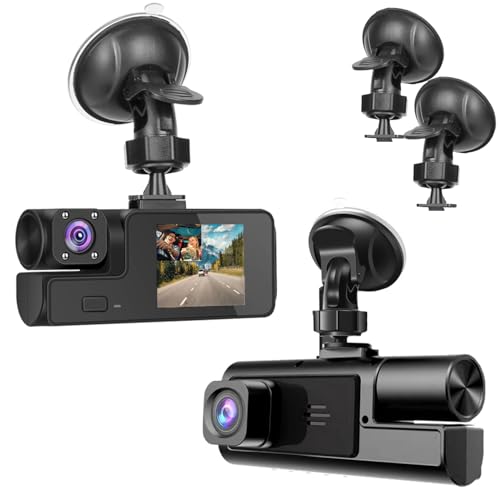 | Budget-Friendly Pick | Channel Setup: Front + inside | Video Resolution: 1080P | Screen Size: 2-inch | VIEW LATEST PRICE | Read Our Analysis |
| Coolcrazy 4K Front and Rear Dash Cam |  | Best 4K Option | Channel Setup: Front + rear | Video Resolution: 4K + 1080P | Screen Size: 3-inch | VIEW LATEST PRICE | Read Our Analysis |
| Vantrue N4S 3 Channel Dash Cam (RC18) |  | Best Premium Choice | Channel Setup: Front + inside + rear | Video Resolution: 2.7K + 1440P + 1440P | Screen Size: 2.7-inch | VIEW LATEST PRICE | Read Our Analysis |
| 2.5K Dual Dash Cam Front and Inside |  | Best Front-Inside Setup | Channel Setup: Front + inside | Video Resolution: 2.5K + 1080P | Screen Size: 3-inch | VIEW LATEST PRICE | Read Our Analysis |
More Details on Our Top Picks
Dual Dash Cam for Cars with 2.5K Front/Rear
If you want a dual dash cam that delivers strong front and rear coverage without making your drive more complicated, the ecomoment S70 is a smart choice. It records in 2.5K on both the front and rear, with 1080p and 1440p support when you want different detail levels. The 170-degree viewing angle helps capture more of the road, and the 3.16-inch IPS screen makes it easy to review clips quickly. Night driving is easier too, thanks to the F1.8 lens, six layers, WDR, and improved light intake. It also includes a 32GB card, loop recording, G-sensor protection, and 24-hour parking support.
- Channel Setup:Front + rear
- Video Resolution:2.5K + 1080P
- Screen Size:3.16-inch
- Night Vision:Super night vision
- Parking Mode:24H monitor
- GPS/WiFi:App control
- Additional Feature:32GB card included
- Additional Feature:170° wide-angle lens
- Additional Feature:12-month replacement service
Milerong X25 Dual Dash Cam with 64GB Card
The Milerong X25 Dual Dash Cam with 64GB card is a smart choice if you drive for Uber, Lyft, or taxi work and want clear proof of what happens on the road and inside your cabin. It records 1080P front and cabin video, with a 170 degree front lens and 140 degree cabin view. The 2 inch IPS screen makes setup simple. Night driving is easier with F1.8 optics, IR lights, and WDR. Loop recording, G sensor locking, and 24H parking mode help protect important clips. It powers from your cigarette lighter, and the included card saves you time.
- Channel Setup:Front + inside
- Video Resolution:1080P + 1080P
- Screen Size:2-inch
- Night Vision:IR night vision
- Parking Mode:24H standby
- GPS/WiFi:None
- Additional Feature:64GB card included
- Additional Feature:4 IR lights
- Additional Feature:31-second impact recording
1080P Dual Dash Cam for Front and Inside
If you want a dash cam that records both the road ahead and the cabin, this 1080P Dual Dash Cam for Front and Inside is a practical choice, especially for drivers who carry passengers, family members, or work crews and need clear evidence from both views. It records in 1920 x 1080P video, uses a 170-degree lens, and captures at 30 FPS for smooth footage. Night vision and WDR help when lighting is low. The 2-inch IPS screen makes setup simple, and the windshield mount keeps the installation neat. It also includes loop recording, G-sensor lock, motion detection, and audio recording to protect important moments in cars, trucks, buses, RVs, and farm equipment.
- Channel Setup:Front + inside
- Video Resolution:1080P
- Screen Size:2-inch
- Night Vision:Night vision
- Parking Mode:Motion parking
- GPS/WiFi:None
- Additional Feature:Audio recording support
- Additional Feature:Accident scene restoration
- Additional Feature:Lithium polymer battery
Coolcrazy 4K Front and Rear Dash Cam
Coolcrazy’s 4K Front and Rear Dash Cam is a strong choice for drivers who want clear evidence and peace of mind on every trip, because it records both the road ahead and what is behind you in sharp detail. It offers 4K front video, 1080P rear video, and 60 fps for crisp plates and signs. The wide lenses help on busy streets and open highways. At night, STARVIS, HDR, and WDR reduce glare. GPS, 5GHz WiFi, a 128GB card, parking monitoring, and easy app control make it ready to use right away.
- Channel Setup:Front + rear
- Video Resolution:4K + 1080P
- Screen Size:3-inch
- Night Vision:STARVIS HDR
- Parking Mode:24H monitoring
- GPS/WiFi:GPS + 5GHz WiFi
- Additional Feature:128GB card included
- Additional Feature:60fps recording
- Additional Feature:5GHz WiFi transfer
Vantrue N4S 3 Channel Dash Cam (RC18)
Vantrue’s N4S 3 Channel Dash Cam is a strong choice if you want one device to monitor the road, the cabin, and the rear at the same time. It records in 2.7K at the front, 1440P inside, and 1440P at the rear, which helps capture plates, faces, and lane details more clearly. Triple STARVIS 2 sensors, HDR, and PlatePix improve performance on dark roads and in glare. You can mount it quickly, rotate the rear camera, and rely on parking modes for round the clock monitoring. 5GHz Wi-Fi, GPS, and 1TB support make everyday use straightforward.
- Channel Setup:Front + inside + rear
- Video Resolution:2.7K + 1440P + 1440P
- Screen Size:2.7-inch
- Night Vision:Night Vision 4.0
- Parking Mode:4 parking modes
- GPS/WiFi:5GHz Wi‑Fi + GPS
- Additional Feature:Triple STARVIS 2 sensors
- Additional Feature:360° rear rotation
- Additional Feature:18-month warranty
2.5K Dual Dash Cam Front and Inside
The 2.5K Dual Dash Cam Front and Inside is a smart choice for drivers who want clear proof from both the road and the cabin, especially rideshare drivers, family vehicles, and fleet use. You get 2.5K front video, 1080P inside video, and a 170° front view, so you see more and miss less. The 360° rotating interior lens helps cover passengers and side spots. Built in WiFi and GPS let you check speed, location, and clips in the app. Night vision, G sensor lock, and 24H parking mode add peace of mind, while the 3 inch screen and 32GB card make setup simple.
- Channel Setup:Front + inside
- Video Resolution:2.5K + 1080P
- Screen Size:3-inch
- Night Vision:Super night vision
- Parking Mode:24H parking
- GPS/WiFi:WiFi + GPS
- Additional Feature:360° rotating interior camera
- Additional Feature:32GB card preinstalled
- Additional Feature:24/7 customer support
Factors to Consider When Choosing a Car Dual Dash Cam
When choosing a car dual dash cam, start with video resolution because clear footage makes important details easier to see when you need them most. Also check night vision, storage capacity, parking mode, and field of view, since each feature affects how well the camera protects your car while driving and when parked. A strong balance of these features can help you avoid problems later and give you valuable peace of mind.
Video Resolution
Video resolution can make or break how useful your dual dash cam footage really is. You want clear details because sharper video helps you read license plates, spot road signs, and track lane markings whenever something goes wrong. For most drivers, 1080p is the lowest practical choice, but 1440p or 2.5K gives you more room to zoom in without making the image messy. Also, check both cameras, not just the front. A setup with 2.5K front and 1080p rear, or 4K front and 1080p rear, can work well, provided that both sides fit your needs. Frame rate matters too, since 30 fps feels smooth and 60 fps can catch faster motion better. Just bear in mind that higher resolution uses storage faster, so balance clarity with memory card space.
Night Vision
Night footage can be the difference between useful proof and a blurry mess, so this is where your dual dash cam really earns its keep. Look for a wide aperture like F1.8 because it pulls in more light on dark roads, in tunnels, and in parking lots. A multi-layer lens or STARVIS style sensor can help you capture brighter video with less grain when the sky turns black. WDR or HDR also matters, since it balances harsh headlights against shadowy streets and keeps glare down. If you want cabin coverage, infrared LEDs can help in total darkness, though the image may turn grayscale. Finally, choose at least 1080p at 30 fps so plates and signs stay easier to read.
Storage Capacity
A smart dual dash cam needs enough storage to keep both the front and rear views recording without stress. You should aim for a card with 64GB to 256GB, and if you want longer drives covered, some models even support 1TB microSD cards. Higher resolution, such as 2.5K front with 1080P rear or 4K front with 1080P rear, uses space faster, so larger cards help a lot. Loop recording keeps things simple by writing over old unprotected files once the card fills up. That way, you do not need to monitor the camera constantly. Also, make sure the G sensor protects crash clips so they stay safe. If the package includes a card, check its size, because 32GB, 64GB, or 128GB affects how long you can record before looping starts.
Parking Mode
Once you know your dual dash cam has enough storage, the next thing to think about is parking mode, because that is what keeps watch when you leave the car behind. You want a system that starts recording when it senses motion or a bump, so it can catch a hit, a scrape, or unusual activity. Many cams save only a short clip, often about 30 seconds, then switch to standby to save power. That is fine as long as the file is locked, because you do not want loop recording to erase the evidence. If you need all-day protection, look for 24-hour monitoring, but keep in mind that this usually requires a hardwire kit or another constant power source. Low-bitrate or low-frame-rate modes can also help your camera stay on longer without draining the battery too quickly.
Field Of View
How wide should your dash cam see? You want a field of view wide enough to catch nearby lanes, side impacts, and the traffic around your car. A 170° front lens can capture more of the road, so you keep key details if trouble starts. For the rear camera, an angle of 140° to 150° often works well because it shows traffic behind you without stretching the image too much. Still, do not choose the widest number only. Very wide views can bend signs, cars, and lane lines at the edges. You need clear coverage, not a fishbowl effect. Compare front and rear angles separately, then choose a balanced setup that sees enough without hiding what matters.
Connectivity Features
What kind of access do you want from your dash cam? If you want quick checks and easy sharing, choose built-in Wi-Fi. You can open an app, preview clips, download video, trim files, and send proof quickly from your phone. That helps when a fender bender leaves you shaken and you need evidence right away. For even smoother transfers, some models use 5GHz Wi-Fi, which can move large files at about 20MB/s. If you want more than video, look for GPS too. It adds location, speed, and route data, which can support your case. If you prefer to keep things simple, skip wireless extras and use local storage with direct device controls only.
Installation Ease
A smooth install can save you a lot of stress, so start by checking whether the dual dash cam comes with every part you need. Look for rear camera cables around 20 to 23 feet and power cables around 11 to 12 feet, since those lengths help you route wires neatly without stretching. Next, choose a model with a windshield mount, adhesive or suction support, and useful pry tools or cable clips. Those small extras can turn a messy job into a clean one. Also, check whether it powers through the cigarette lighter socket or USB-C, because plug-and-play setups are usually much easier than hardwiring. If you want parking monitoring, make sure you are ready for a hardwire kit. A built-in 2 to 3.16 inch display also helps you aim both cameras with less guesswork.
Frequently Asked Questions
How Do I Install a Dual Dash Cam Without Professional Help?
You’ll install it yourself easily: mount the front and rear cameras, route the cable along the trim, plug it into power, format the card, then test the angles. If you’re patient, the process is straightforward.
Do Dual Dash Cams Work When the Car Is Parked?
Yes, if you enable parking mode and power it with a hardwire kit, battery pack, or constant 12V source, you can capture motion and impacts while parked. Otherwise, most cameras shut off with the ignition.
Which Memory Card Size Is Best for Dual Dash Cams?
You’ll usually want a 128GB or 256GB high endurance microSD card for dual dash cams. It gives you plenty of recording time, handles constant overwriting, and does not fill up too quickly during long drives.
Can I Connect a Dual Dash Cam to My Smartphone?
Yes, you can connect a dual dash cam to your smartphone if it has Wi-Fi or Bluetooth. You can usually use the app to view footage, change settings, and download clips directly to your phone.
How Often Should I Format the Dash Cam Storage?
You should format your dash cam storage every 1 to 2 months, or whenever it starts acting sluggish. This helps keep recordings reliable, reduces file errors, and can help the card last longer over time.
