

Looking for a fast, reliable code reader that just works? Start with the OBD2 Scanner LK11 for solid live data and VIN checks.
Try the FOXWELL NT301 for color graphs and free updates, or the OBD2 Car Scan Tool for Mode 6 and a large DTC library.
BlueDriver pairs to your phone with repair reports, CGSULIT SC103 offers a clear color screen and warranty, and a Bluetooth iOS/Android unit adds mobile convenience and logging.
| OBD2 Scanner LK11 Professional Code Reader |
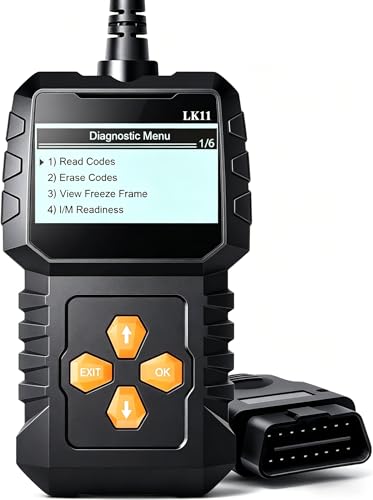
| DIY-Friendly Tool | Read/Clear DTCs: Retrieve and clear engine fault (DTC) codes | Live Data Streaming: View live data streams and freeze frame information | I/M Readiness / Emissions Status: Read I/M readiness status | VIEW LATEST PRICE | Read Our Analysis |
| FOXWELL NT301 OBD2 Scanner Diagnostic Code Reader |

| Emissions Tester | Read/Clear DTCs: Read DTCs and turn off CEL/MIL; clear codes | Live Data Streaming: Live data streaming, graphing and logging | I/M Readiness / Emissions Status: Access emissions readiness status; LEDs for I/M readiness | VIEW LATEST PRICE | Read Our Analysis |
| OBD2 Car Scan Tool with Code Reader & Reset |

| Feature-Rich Reader | Read/Clear DTCs: Read & clear diagnostic trouble codes (DTCs) | Live Data Streaming: Live data stream, freeze frame, onboard monitoring | I/M Readiness / Emissions Status: I/M readiness, Mode 6, Mode 8 | VIEW LATEST PRICE | Read Our Analysis |
| BlueDriver Bluetooth Pro OBDII Scan Tool for Cars |

| Pro-Level Wireless | Read/Clear DTCs: Read and clear check engine (OBD‑II) codes | Live Data Streaming: Real-time live data monitoring while driving | I/M Readiness / Emissions Status: (Supports OBD2 gas vehicles) includes readiness checks via app | VIEW LATEST PRICE | Read Our Analysis |
| CGSULIT SC103 OBD2 Car Code Reader & Scanner |

| Shop-Ready Performer | Read/Clear DTCs: Read and clear diagnostic trouble codes (DTCs) | Live Data Streaming: Live data stream in text and graphical formats; freeze-frame comparison | I/M Readiness / Emissions Status: I/M readiness status check | VIEW LATEST PRICE | Read Our Analysis |
| OBD2 Bluetooth Scanner for iOS & Android |
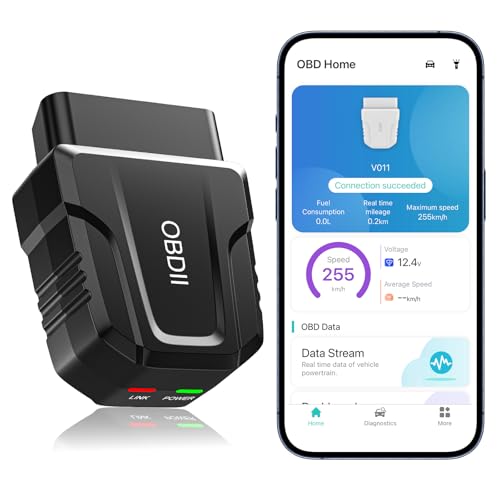
| Mobile Convenience | Read/Clear DTCs: Fast reading of diagnostic trouble codes; clear error codes after repairs | Live Data Streaming: Live data streaming with charts and sensor values | I/M Readiness / Emissions Status: Electronic emission readiness checks | VIEW LATEST PRICE | Read Our Analysis |
More Details on Our Top Picks
OBD2 Scanner LK11 Professional Code Reader
Should you want a simple, reliable tool that gets you answers fast, the OBD2 Scanner LK11 Professional Code Reader is a great fit for DIYers and pros who need quick, accurate engine diagnostics. You plug it into the OBDII port and get instant codes without fuss. You can read and clear DTCs, view live data and freeze frame, and check I M readiness to prepare for repairs. You’ll see VIN, Calibration ID, CVN, coolant temperature, and vehicle speed for detailed troubleshooting. You’ll catch issues promptly to avoid big bills, speed up fixes, and keep your engine running longer.
- Read/Clear DTCs:Retrieve and clear engine fault (DTC) codes
- Live Data Streaming:View live data streams and freeze frame information
- I/M Readiness / Emissions Status:Read I/M readiness status
- VIN / Vehicle Info Retrieval:Retrieves VIN, Calibration ID, CVN
- OBD‑II Protocol / Vehicle Compatibility:Plug-and-play OBD‑II port compatible (1996+)
- Target User / Use Case (DIY & Pro):For DIY enthusiasts, home mechanics and professional technicians
- Additional Feature:VIN / CVN retrieval
- Additional Feature:Freeze-frame viewing
- Additional Feature:Professional-level details
FOXWELL NT301 OBD2 Scanner Diagnostic Code Reader
Should you want a straightforward, reliable OBD2 reader that gets you back on the road fast, the FOXWELL NT301 is built for DIYers and small shops who need clear engine diagnostics without fuss. You plug it into the 16 pin DLC or USB and it powers up instantly. You’ll read DTCs, check emissions readiness, view live data, graph values, log sessions, and retrieve VIN. You can clear the check engine light after repair, though codes return unless the fault remains. It supports common OBD II protocols and most 1996 plus vehicles. The color screen, LEDs, free updates, and support keep you confident.
- Read/Clear DTCs:Read DTCs and turn off CEL/MIL; clear codes
- Live Data Streaming:Live data streaming, graphing and logging
- I/M Readiness / Emissions Status:Access emissions readiness status; LEDs for I/M readiness
- VIN / Vehicle Info Retrieval:Retrieve VIN
- OBD‑II Protocol / Vehicle Compatibility:Supports KWP2000, J1850 VPW, ISO9141, J1850 PWM, CAN; 1996+ US, 2000+ EU/Asia
- Target User / Use Case (DIY & Pro):Recommended for home and autoshop toolboxes
- Additional Feature:Live data graphing
- Additional Feature:I/M LEDs & buzzer
- Additional Feature:Free lifetime updates
OBD2 Car Scan Tool with Code Reader & Reset
Should you want a compact, easy-to-use scanner that gets you straight to the problem, this OBD2 Car Scan Tool with Code Reader and Reset is a great pick for DIYers and small-shop techs alike. You plug it into any OBDII port on vehicles since 1996, and it reads and clears DTCs, turns off the MIL, and checks I M readiness, Mode 6, and Mode 8. You’ll see live data, freeze frame, VIN, and battery voltage. A built-in DTC library of 35,901 codes helps you identify causes fast. It’s small, comes with a Type-C cable and bag, and offers lifetime updates.
- Read/Clear DTCs:Read & clear diagnostic trouble codes (DTCs)
- Live Data Streaming:Live data stream, freeze frame, onboard monitoring
- I/M Readiness / Emissions Status:I/M readiness, Mode 6, Mode 8
- VIN / Vehicle Info Retrieval:Retrieve vehicle VIN; multiple languages supported
- OBD‑II Protocol / Vehicle Compatibility:Compatible with all OBDII vehicles since 1996; broad make coverage
- Target User / Use Case (DIY & Pro):Designed for broad users (DIY and professional); multi-language support
- Additional Feature:Built-in DTC library
- Additional Feature:Type-C data printing
- Additional Feature:Mode 6 & 8 support
BlueDriver Bluetooth Pro OBDII Scan Tool for Cars
Should you want a pro-level scan tool that stays simple to use, the BlueDriver Bluetooth Pro is a great pick for DIYers and small-shop mechanics who want fast, accurate diagnostics without a lot of fuss. You plug the compact sensor into your car and pair it to your phone. Then you read and clear check engine, ABS, airbag, TPMS, and other codes. You can watch live data while driving and pull unlimited repair reports with causes and fixes. The app links to videos and step steps and offers advanced diagnostics for many makes. No subscription, no account, and 24/7 support.
- Read/Clear DTCs:Read and clear check engine (OBD‑II) codes
- Live Data Streaming:Real-time live data monitoring while driving
- I/M Readiness / Emissions Status:(Supports OBD2 gas vehicles) includes readiness checks via app
- VIN / Vehicle Info Retrieval:App provides vehicle-specific diagnostics; supports many makes (VIN retrieval noted)
- OBD‑II Protocol / Vehicle Compatibility:Compatible with all gas vehicles 1996+; supports many makes (enhanced diagnostics varies)
- Target User / Use Case (DIY & Pro):For consumers and professional mechanics (professional‑level diagnostics via app)
- Additional Feature:ABS & SRS diagnostics
- Additional Feature:Unlimited repair reports
- Additional Feature:Wireless Bluetooth app
CGSULIT SC103 OBD2 Car Code Reader & Scanner
Provided you want a simple, reliable scanner that gets you back on the road fast, the CGSULIT SC103 is made for DIYers and small shops who need straightforward diagnostics without fuss. You’ll plug it into your OBD2 port and read or clear trouble codes, view live data like RPM and coolant temp, and check I M readiness. It shows freeze frame and compares it to live readings, and runs a voltage test. The 2.8 inch color screen and fast industrial chip keep things clear. It supports all OBDII protocols for most cars and trucks, includes a DTC library, and has a three year warranty.
- Read/Clear DTCs:Read and clear diagnostic trouble codes (DTCs)
- Live Data Streaming:Live data stream in text and graphical formats; freeze-frame comparison
- I/M Readiness / Emissions Status:I/M readiness status check
- VIN / Vehicle Info Retrieval:Retrieve VIN (vehicle coverage specified)
- OBD‑II Protocol / Vehicle Compatibility:Supports all OBDII protocols (KWP2000, J1850 VPW, ISO9141, J1850 PWM, CAN); US 1996+, EU/Asia listed
- Target User / Use Case (DIY & Pro):Suitable for professional shops and DIY users
- Additional Feature:2.8″ color screen
- Additional Feature:3-year manufacturer warranty
- Additional Feature:Scotty Kilmer endorsed
OBD2 Bluetooth Scanner for iOS & Android
Should you want a plug and play scanner that gets you back on the road faster, the V011 OBD2 Bluetooth reader is made for DIYers, commuters, and anyone who wants clear, quick car diagnostics without a mechanic’s bill. You plug it in, turn the ignition on, and open the app. It streams live data like RPM, coolant temp, speed, and sensor readings so you catch issues promptly. The app reads and clears DTCs, shows freeze frame and readiness, and fetches VIN. Bluetooth 5.4 pairs fast with iOS and Android. Follow guides, watch tutorials, then unplug to save your battery.
- Read/Clear DTCs:Fast reading of diagnostic trouble codes; clear error codes after repairs
- Live Data Streaming:Live data streaming with charts and sensor values
- I/M Readiness / Emissions Status:Electronic emission readiness checks
- VIN / Vehicle Info Retrieval:VIN retrieval, diagnostic reports
- OBD‑II Protocol / Vehicle Compatibility:Supports 9 OBD2 protocols; compatible with over 96% of makes/models (1996–present)
- Target User / Use Case (DIY & Pro):Aimed at novices and enthusiasts to reduce shop visits; supports professional use
- Additional Feature:Bluetooth 5.4 connectivity
- Additional Feature:Multilingual app support
- Additional Feature:Driving data charts
Factors to Consider When Choosing Code Readers
When you pick a code reader, consider about which vehicles it supports and how deep its diagnostics go so you won’t buy something that leaves you guessing. Also check whether it shows live data and can log for later review, how easy it is to use, and what connectivity options it offers so you can work comfortably and confidently. Those factors connect directly to whether the tool saves you time, reduces stress, and actually helps you fix the problem.
Vehicle Compatibility Range
Should you want a code reader that truly works for your vehicle, start checking the protocols, model years, and system coverage the tool lists so you won’t waste time on a device that can’t talk to your car. You’ll initially match protocols like CAN, ISO9141-2, KWP2000, and J1850 VPW or PWM to avoid basic communication failure. Next, confirm model-year support since US OBD-II usually starts in 1996 while European and Asian coverage can vary. Also look at which systems the reader accesses: engine only or extended modules such as ABS, SRS, transmission, and maker-specific modules. Check voltage and vehicle type so you don’t buy a 12V tool for a 24V or heavy-duty rig. Finally, should you want VIN, CID, CVN, or live PIDs, verify those features for your make and year.
Diagnostic Coverage Depth
Should you want a code reader that really helps you fix problems, look past simple DTC flashing and dig into diagnostic coverage depth. You deserve a tool that accesses not just generic powertrain codes but ABS, SRS, transmission, and other module specific faults. Check for Mode 6 and freeze frame so you can see intermittent or pending errors. Seek bi directional tests and special service functions whenever you need to run adaptations, DPF regen, ABS bleed, or battery registration. Confirm the scanner supports the protocols and manufacturer PIDs your vehicle uses, since coverage varies across make and year. Also review live data sample rate, how many PIDs display at once, and trend recording to catch transient issues you could otherwise miss.
Live Data And Logging
For real troubleshooting you want live data and logging that feel like a conversation with your car, not a wall of numbers. You’ll watch RPM, speed, coolant temp, and oxygen voltages update multiple times per second so you catch transient faults. Whenever the scanner graphs trends you see how parameters relate, like boost pressure rising with RPM, and that makes intermittent problems obvious. Logging records those streams with timestamps so you can replay freezes, compare before and after repairs, and show proof whenever you need it. Make sure the tool supports Mode 1 live data, Mode 6 component tests, freeze-frame capture, and PID definitions for your vehicle. Confirm export options such as CSV or TXT and PC or mobile app support for deeper analysis.
Ease Of Use
How easily you can use a code reader often decides whether you’ll reach for it or leave it in the glove box. You want plug-and-play operation, so you just plug into the OBD-II port or pair via Bluetooth without special setup. Look for a clear, legible display with simple menus so you spend seconds reading codes and live data. One-button read and clear plus I/M readiness checks remove guesswork during routine stops. Built-in DTC definitions or app explanations help you understand faults right away, so you won’t need a separate code book. Choose a unit that powers from the vehicle or auto-connects on ignition to avoid battery worries. These choices make diagnostics stress-free and keep you confident on the road.
Connectivity Options
Upon selecting a code reader, connection type matters because it shapes how you use the tool every day. You’ll choose wired OBD-II whenever you want instant power and steady data without pairing or batteries, as long as you can reach the diagnostic port. Bluetooth adapters let you move freely and stream to your phone, but you’ll check Bluetooth versions and vehicle compatibility initially. Wi-Fi interfaces give faster throughput and longer range, though they make you join a separate network and could drain power faster. USB scanners provide high-speed links for PC logging and printing, but they need a laptop and a compatible cable. Consider convenience, drive-testing needs, and security tradeoffs before you buy.
Update And Support
Upon purchasing a code reader, updates and support decide how long the tool will actually help you, so you’ll want to weigh those options carefully. Check whether the maker gives free lifetime updates or only a limited period like one year, since cars change fast and you need refreshed firmware and data. Also confirm how updates arrive — USB, Bluetooth, Wi‑Fi, or SD card — and whether you must use a computer or special app so you don’t hit compatibility snags. Make sure updates add vehicle coverage, new diagnostic parameters, and current DTC definitions so the reader stays useful. Look for clear support channels such as email, phone, or in‑app chat with posted response times. Finally ask provided that updates or support require accounts, subscriptions, or extra fees.
Price Versus Value
As you’re choosing a code reader, consider beyond the sticker price and focus on the value it gives you over time, because a cheap tool today can cost you more tomorrow should it lacks the features or support you need. Reflect on how often you’ll use it and what you’ll ask it to do. In the event you only clear engine codes, a basic OBD-II reader will save money and hassle. In the event you diagnose ABS, SRS, transmissions, or log live data, pay more for advanced functions. Also factor in subscription fees, app features, and paid data libraries when comparing totals. Check vehicle coverage and supported protocols to avoid surprises. Finally, weigh build quality, warranty length, and update policies since durability and support often repay a higher upfront cost.
